
GUIDE

IT Compliance: An Essential Guide for Businesses

One failed audit. One data breach. One missing certification. Any of these can instantly disqualify your business from million-dollar contracts and trigger six-figure penalties. Most companies don't realize they're non-compliant until it's too late. Is yours one of them?

Send a PDF copy of this guide to:

Don’t have time to read now?

No worries! We can email you a PDF copy of IT Compliance: An Essential Guide for Businesses so you can access important information anywhere, anytime.

What You'll Learn

Navigating IT compliance doesn't have to feel overwhelming. This guide transforms complex regulatory terms into straightforward action plans you can implement today.


Inside, you will discover:

Which compliance framework matters for your specific industry and why

Real-world budget expectations and realistic implementation timelines
The hidden pitfalls that cause most audits to fail (and how to avoid them)
Proven strategies that keep you compliant year after year, not just for one assessment
A practical checklist you can use right now to evaluate your current security posture
Smart ways to leverage expert help from MSSPs without breaking your budget

Who Is This Guide For?

This guide is for business leaders, IT professionals, and anyone responsible for protecting company data. Whether you manage security, oversee technology, or run the business, this resource helps you navigate IT compliance requirements.


You'll find this guide especially useful if you:

  • Work in healthcare, finance, manufacturing, or defense contracting
  • Handle customer data or sensitive business information
  • Need to meet specific regulatory requirements for your industry
  • Want to protect your business from cyber threats and data breaches
  • Seek to build trust with customers and business partners through proven security practices

Different Ways to Achieve IT Compliance

Many businesses struggle with how to build and maintain compliance. Most choose one of three paths: fully managed IT, co-managed IT, or an in-house program supported by project-based consultants. The best fit depends on your team, budget, and risk.


Managed IT

Managed IT means outsourcing most day-to-day security and compliance tasks to a specialized provider. This works well for small and mid-sized organizations that lack internal IT expertise or simply can't afford to build a full compliance team from scratch.

Your managed securityservice provider (MSSP) can:

  • Run gap assessments
  • Implement and monitor controls
  • Manage documentation
  • Train staff
  • Support you during audits

Depending on your plan, you also get access to experienced compliance professionals, enterprise-grade security tools, and 24/7 monitoring without the overhead of hiring full-time specialists.

This model delivers monthly costs and lets you focus on running your business instead of wrestling with technical requirements.


What is Managed IT Services? [Video]

Co-Managed IT

Co-managed IT takes a partnership approach. Your existing IT team remains in place and handles day-to-day operations while external experts provide specialized compliance support and fill knowledge gaps.

This model makes sense when you already have capable IT staff but need more profound expertise in specific compliance frameworks or additional capacity during implementation.

What is Co-Managed IT? [& Do You Need It?]

The external team works alongside your people, providing strategic guidance, conducting assessments, implementing advanced security measures, and preparing you for audits. Your team gains valuable knowledge through this collaboration while maintaining control over your systems.

Co-managed IT offers flexibility, as you can scale external support up or down based on your contract, current needs, and budget. Many teams use this model as a bridge to a mature in-house program.


What is Co-Managed IT? [Video]

In-House + Project-Based Consultants

Some organizations keep compliance in-house and bring in consultants for targeted work. Common projects include:

  • Risk assessments
  • Penetration tests
  • Policy updates
  • Readiness reviews
  • Specialized frameworks
  • Audit preparation

Several MSSPs offer support with fixed-scope projects or partner with vetted specialists, so you can buy only the pieces you need.

This option gives you maximum control, though it requires an ongoing budget for people, training, tools, and independent testing to stay objective.

Any of these paths can work if roles are clear, evidence is organized, and controls are tested regularly. Choose the model that lets you move fastest without losing accountability.

Co-managed IT vs. Managed IT (Pros and Cons)

What are the Major IT Compliance Regulations?

Each of the following regulations focuses on a specific industry or type of data. Knowing which one applies to your business helps you stay compliant and avoid costly mistakes.

HIPAA (Health Insurance Portability and Accountability Act)

HIPAA protects patient health data for healthcare providers and partners. It includes three main rules:

  • Privacy: controls data sharing
  • Security: protects electronic records
  • Breach Notification: requires disclosure after a breach

Strong access control, encryption, and regular risk assessments are crucial to HIPAA.

 

7 Best Security Practices for HIPAA Compliance (2025)
HIPAA
Benefits

What are the Benefits of IT Compliance?

Compliance does more than keeping regulators happy. The right approach strengthens your entire business operations, directly impacting your bottom line.

Protection from Costly Breaches

Data breaches drain millions from companies through recovery costs, legal battles, and lost business. Compliance frameworks require security controls that actually stop most attacks before they happen.


When you follow these standards, you're dramatically reducing your risk. Think of it as insurance that actually prevents the accident.

Building Customer Trust

Your clients want to know their data is safe with you. When you can show them certifications like SOC 2 or HIPAA compliance, you're proving you take security seriously.


That trust built translates directly into stronger relationships and more business coming through your door.

Gaining Competitive Advantage

Several big companies won't work with vendors who lack the required certifications. Defense contractors can't even bid on DoD (Department of Defense) government contracts without CMMC.


Healthcare providers can't legally operate without HIPAA compliance. Getting compliant opens opportunities that you may otherwise miss.

What are the Challenges of IT Compliance?

IT compliance can strain time and budget. Knowing the biggest hurdles helps you plan ahead and avoid costly mistakes.

 

Overwhelming Complexity

Overwhelming Complexity  icon

Compliance frameworks include hundreds of controls. Each one comes with detailed requirements that can make your head spin. For small businesses without a dedicated compliance staff, trying to make sense of all this feels like reading a foreign language.

 

Managing Costs

Managing Costs icon

Compliance can be expensive. Third-party audits often cost tens of thousands of dollars or more. You must also budget for security tools and ongoing licenses. Many businesses hire compliance specialists, which increases payroll.

For small companies, these costs can strain already tight budgets.

 

Keeping Up with Changes

Keeping Up with Change iconCompliance rules change often. New cyber threats emerge, requiring updates to controls and policies. Methods that worked last year may not be enough today. Organizations need regular reviews and updates to stay compliant.

10 FTC Safeguard Rule Changes & What It Means for Auto Dealerships

 

Limited Resources

Limited Resources  icon

Compliance with regulatory frameworks requires skilled people, time, and budget. You need technical experts who understand the requirements and staff to create and maintain documentation.

Moreover, funds are necessary for tools, training, and assessments. Many organizations do not have enough people or money to meet all of these demands.

How Much Does Managed IT Cost? (5 Price Factors) [Updated]

Compliance is achievable, even with these challenges. The key is to break the work into small steps, set clear priorities, and bring in experts when needed. Aim for steady progress rather than a one-time push.


Benefits

Who Benefits from IT Compliance?

IT compliance benefits many types of organizations. If your business handles sensitive data such as customer records, health information, or payment details, these frameworks enhance your data protection. They also help you meet legal and contract requirements and build trust with clients.

Healthcare Organizations

HIPAA compliance is required for hospitals, clinics, and medical practices that handle electronic patient information. It protects patient records and reduces the risk of breaches and fines.


Health plans, insurers, and medical billing services must also follow HIPAA, either as covered entities or as business associates. Patient data is among the most sensitive types of information and needs strong safeguards.

The Ultimate Guide to Managed IT for Healthcare
Healthcare Organizations

How Much Does IT Compliance Cost?

Compliance costs depend on the framework and your size, systems, and risk. Below is a grounded snapshot to set expectations.


HIPAA Compliance

HIPAA does not require an official government certification, but many providers use third-party assessments to meet customer and insurer requirements. Total cost rises with complexity and the amount of work outsourced.

Small medical practices spend $15,000–$50,000 for basic programs or $60,000–$120,000 on full programs with outside help. Ongoing maintenance like training, risk reviews, and scanning adds $10,000–$30,000 yearly.


CMMC Certification

CMMC costs depend on your level and size. Small contractors spend around $50,000-$200,000 for Level 2 implementation and $16,000–$70,000 for annual upkeep. Assessments range from $25,000–$112,000, depending on certification type and company size.


FTC Safeguards Rule

When it comes to the FTC Safeguards package, the price starts at $24 per endpoint. The costs include staff training, encryption, monitoring, and reports to leadership. Breach notifications average about $330 per report.


GDPR Compliance

There is no official fixed price for GDPR compliance. EU and national regulators describe requirements, not universal fees. Your budget depends on your size, systems, data risks, and whether you need roles like a Data Protection Officer.

Typical small business costs include documentation, data mapping, and training. Annual fees to the UK’s ICO range from £52 to £3,763. Fines for violations can reach €20 million or 4% of revenue.


SOC 2 Compliance Costs

There is no official fee schedule for SOC 2. AICPA defines the standard but not its cost. Prices change with scope, size, trust criteria, and whether you do Type I or Type II.

Audit fees (external CPA, audit only):

  • Type I: $25,000–$60,000
  • Type II: $28,000–$75,000 usually, but large programs can go higher

How Long Does Each Compliance Take?

Timelines vary by framework and by how ready your systems are today. Plan your work in phases: assess, fix, document, train, and verify. Build in time for reviews each year or after major changes.


1-4

HIPAA Compliance

Small practices need 3 to 9 months. Larger organizations take 6 to 12 months. Rollouts include risk analysis, safeguards, policies, and training. Recheck yearly and after changes.


2-Mar-26-2026-07-15-43-6260-PMCMMC

CMMC timelines depends on the level, controls, and assessor capacity. Level 2 prep takes 6 to 12 months (up to 18 months with bigger gaps). If a C3PAO assessment is required, book early; queues can run 6 to 18 months. CMMC assessments are good for three years with annual affirmation in SPRS.


3-Mar-26-2026-07-15-43-6392-PMFTC Safeguards Rule

The FTC Rule does not set a fixed timeline. Your program should match your size, systems, and risks. Keep safeguards current, test and monitor, refresh training, update documents. Have your Qualified Individual report yearly.


4-4GDPR Compliance

GDPR does not set a fixed timeline for compliance. Your schedule depends on your size, systems, and risks. High-risk processing may require a Data Protection Impact Assessment (DPIA), which adds time.


5-2SOC 2 Report

SOC 2 report building timelines vary by report type and readiness. Type I typically takes 2 to 3 months, with reports issued about 4–6 weeks after fixes, while Type II usually spans 6 to 12 months to verify ongoing control effectiveness.

What Happens if We Fail IT Compliance?

Prevention costs far less than fixing everything after a disaster strikes. Investing in compliance now will protect your business from catastrophic consequences later.

Regulatory Fines and Penalties

Regulatory Fines and Penalties  icon Regulators can levy per-violation penalties, require fixes, and monitor you for years. Examples include HIPAA (tiered fines with annual caps) and GDPR (hefty fines tied to revenue). The FTC Safeguards Rule can also trigger civil penalties and mandatory corrective actions.

Loss of Contracts

Loss of ContractsDefense contractors cannot bid on contracts without CMMC certification. Missing CMMC requirements can also mean existing contracts might not get renewed. Similarly, missing SOC 2 often delays enterprise deals or blocks renewals. Noncompliance can also lead customers and partners to pause or end work.

Legal Liability

Legal LiabilityCustomers whose information was compromised will sue you. Class action lawsuits following data breaches routinely cost companies millions in settlements and legal fees.


Shareholders can also sue your leadership team for failing to maintain proper security. These legal battles drain resources and distract everyone from actually running the business.

Reputational Damage

Reputational DamageNews about compliance failures spreads like wildfire on social media. Customers lose trust in companies that can't protect their data. Business partners will get nervous about sharing information with you. As a result, your brand reputation takes hits that last for years. Rebuilding that trust takes forever and costs a fortune.

High Remediation Costs

High Remediation CostsFixing security gaps under regulatory pressure costs far more than properly implementing controls from the start. You end up paying premium rates for emergency consulting, and everyone works overtime to meet impossible deadlines.


In some cases, you need expensive system replacements on compressed timelines. It's a nightmare scenario.

IT Compliance Checklist: What Should I Check During a Compliance Self-Audit?

A compliance self-audit helps you identify gaps before formal assessments. Use this checklist as a starting point for your internal review.
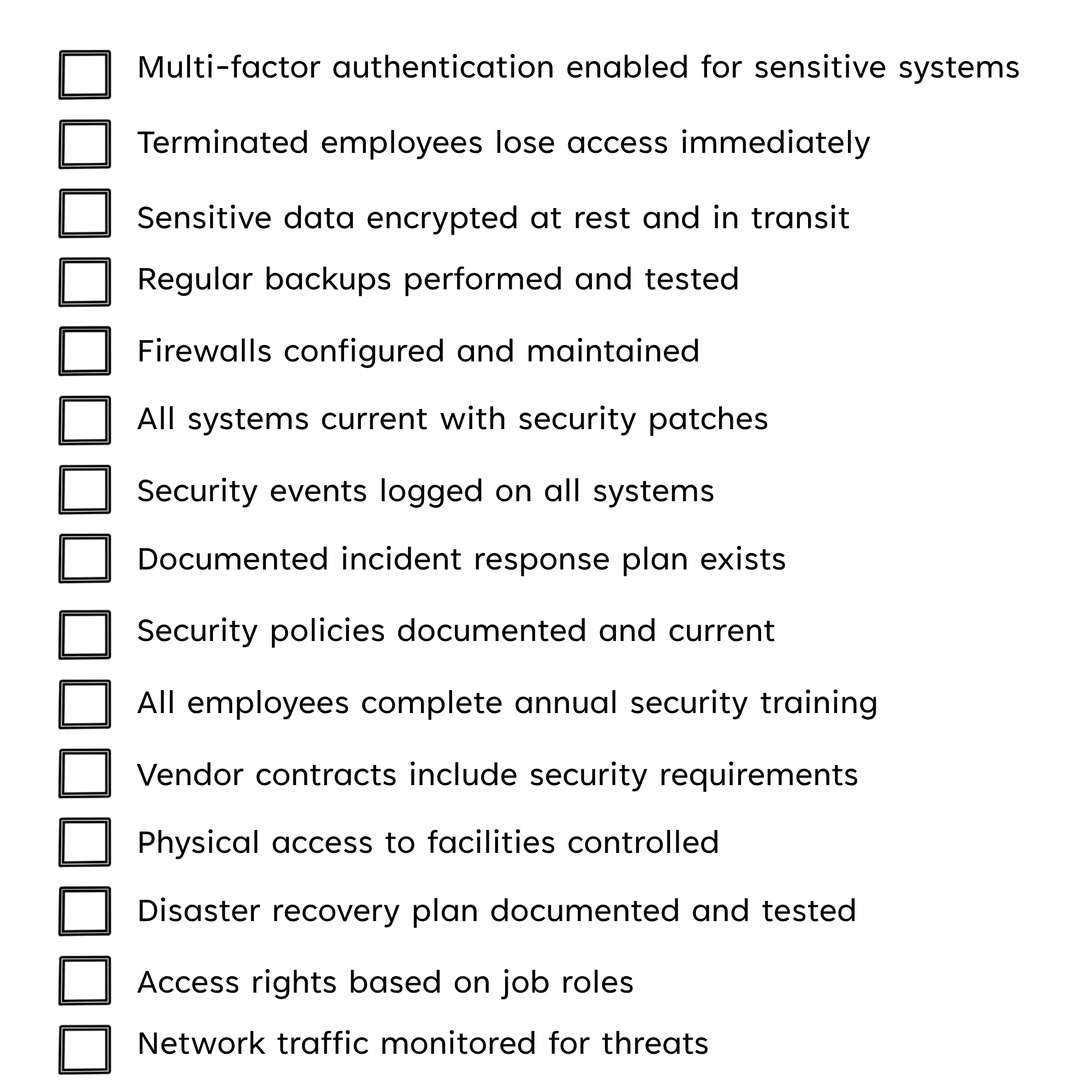
 

General IT Compliance Checklist


This checklist covers major compliance areas but is not exhaustive. Your specific requirements depend on which frameworks apply to your business. Use this as a foundation and expand it based on your particular compliance obligations.

Conduct self-audits at least annually, and more frequently if you're preparing formal assessments. Document your findings and create action plans to address any gaps. Regular self-audits help you maintain compliance and avoid surprises during formal assessments.

For regulation-specific checklists, you can download our HIPAA Compliance Checklist or consult compliance experts who can provide detailed assessment tools for your industry.

Best Practices for IT Compliance

Below are the best security practices that help most organizations meet requirements and stay audit-ready:

 

Start with a Risk Assessment

Risk Assessment-1 Know your risks before you buy tools. List the data you store, where it lives, who can access it, and how it is protected. Map your systems, vendors, and data flows, and document the gaps you identify.

Turn those findings into a simple plan that ranks what to fix first. This becomes your roadmap for budget, timelines, and quick wins.


4 Ways Managed Service Providers Identify Security Risks

 

Document Everything

DocumentWrite policies in plain, clear language that people can follow. Record how each control works and keep proof that it is working. Maintain change logs and store evidence in one place. Good documentation speeds audits and reduces confusion.

 

Use Layered Security

Use Layered SecurityDo not rely on a single security control. Instead, combine network filters, endpoint protection, backups, and email security. Add physical safeguards where needed and use encryption with access controls. Layered security gives you a backup when one control fails.

 

Train Staff Regularly

Train Staff RegularlyProvide security training at hire and at least once a year. Make it role-based and tied to daily tasks, not a generic slideshow. Include short refreshers and phishing tests. When people see why it matters, they follow the rules.

 

Monitor Continuously

Monitor ContinuouslyWatch systems around the clock or use a trusted provider. Centralize logs, review them, and set up alerts that notify someone when problems arise. Triage, investigate, and fix issues quickly. Early detection keeps minor problems from becoming big ones.

 

Update Systems Promptly

Update Systems PromptlyApply security patches on a set schedule. Test updates, then roll them out without long delays. Track assets so nothing gets missed and retire end-of-life systems. Up-to-date software closes easy paths for attackers.


5 Signs You Need a New Server (& 5 Signs You Don’t) [Updated in 2023]

 

Restrict Access

Restrict AccessUse least privilege so people only get the access they need. Require multi-factor authentication for sensitive systems. Remove access immediately when roles change or staff leave. Review permissions often and time-limit elevated access.
 

Conduct Regular Audits

Conduct Regular AuditsRun internal checks before official assessors arrive. Test controls, back-ups, and incident response with real drills. Log findings, assign owners, and fix issues quickly. Track progress so problems do not return.

 

Get Expert Help

Get Expert HelpPartner with certified specialists like managed security service providers (MSSPs) for complex tasks or 24/7 monitoring.

Choose vendors with proven experience in your framework, clear scopes of work, and service-level commitments. Set milestones, assign owners, and track results against your risk plan. This lets your team focus on core work while experts handle the rest.


6 Proven Strategies to Improve CMMC Maturity Levels

How Can an MSSP Help with IT Compliance?

Managed Security Service Providers (MSSPs) help organizations meet requirements more quickly and with fewer mistakes. They bring specialized skills, proven playbooks, and valuable 24/7 support so your team can focus on core work.


Expert Knowledge

MSSPs track laws and standards as part of their daily work. They know which controls pass audits and which steps waste time. This helps you avoid common mistakes and rework.


MSSPs compare your environment to the rules that apply to you. They identify what is missing and rank fixes by risk and effort. You get a clear plan you can execute.


Implementation Support

MSSPs configure security controls like firewalls, encryption, backups, and monitoring systems. They test controls so they work in real life, not just on paper. This hands-on support ensures controls function properly and reduces audit findings.


Documentation Assistance

MSSPs write policies and procedures in clear language and map them to each control. They organize evidence, logs, and reports, so you are ready for reviews. Good records speed audits and cut confusion.


Continuous Monitoring

MSSPs watch systems around the clock and respond to alerts. They investigate issues early and contain threats before they spread. Continuous checks keep you compliant between audits.


Training Services

MSSPs deliver short, role-based lessons and phishing practice tied to real work. They onboard new hires, run annual refreshers, and send quick updates when risks change. MSSPs also track completion and test results, so you can prove training during an audit.


Cost Efficiency

Building an in-house team and toolset is expensive. MSSPs spread platform and staffing costs across clients, which lowers your upfront spending. You get enterprise-grade tools without having to buy everything yourself.


Audit Support

MSSPs help you prepare for auditors, gather evidence, and answer technical questions. They guide you through scoping, sampling, and walkthroughs. That support improves your chance of passing the first time.


Can an MSP Help You with Regulatory Compliance?

Ready to Strengthen Your IT Compliance?

Solid compliance reduces breach risk and penalties, protects revenue, and helps you win and keep enterprise contracts.


You now know what compliance means in practice, which frameworks apply to you (HIPAA, CMMC, GDPR, FTC Safeguards, SOC 2), what it typically costs, how long it takes, and the steps to stay compliant. The next move is action.


For over 20 years, Intelligent Technical Solutions (ITS) has helped hundreds of organizations turn requirements into working controls, clear documentation, and steady monitoring. Our team of experienced engineers and compliance experts guides clients through assessments, remediation, training, vendor oversight, and audit support.


We stay with you from planning through evidence collection to auditor Q&A, and we keep your program current as risks and rules change. With ITS, you get a proven roadmap, enterprise-grade tools, and a partner committed to measurable outcomes.


Don't wait around for a breach or failed audit to force your hand. Take control of your compliance situation today.


Check out our managed IT services pricing to see a clear cost range for your business and plan the next steps.

Need a conversation with an IT compliance expert?

 Schedule a free consultation to review your needs and map the fastest path forward.


Your data deserves stronger protection. Your business deserves the trust and deals that good compliance unlocks. Let's work together to secure your future before problems force you to.

FAQ

Frequently Asked Questions (FAQs) About IT Compliance

Q: What is the difference between IT compliance and cybersecurity?

A: Cybersecurity focuses on protecting systems and data from threats, while IT compliance means following specific regulatory requirements. Compliance often requires implementing certain cybersecurity controls, but good cybersecurity practices go beyond minimum compliance requirements.

Q: Do small businesses need IT compliance?

A: Yes, several compliance requirements apply if you handle protected data or work in a regulated industry, regardless of company size. Being a small business does not exempt you from your duty to comply, and penalties can still be serious.

Q: How often do we need compliance audits?

A: It depends on the framework. CMMC Level 2 certifications can last up to 3 years but require annual reaffirmation. HIPAA requires regular risk analyses, especially after changes, and most SOC 2 reports are updated annually and cover 6 to 12 months.

Q: Can we handle compliance in-house, or do we need outside help?

A: It depends on your resources and expertise. Many businesses benefit from working with consultants or managed service providers who specialize in compliance due to the complexity of requirements.

Q: What happens to our certification if we change our systems?

A: Major system changes can affect your certification or report because the controls may no longer work as tested. Update your risk assessment and documents, fix any gaps, and tell your auditor or assessor so they can decide whether extra testing or an updated report is needed.